Sunday, November 21, 2010

TechNet Virtual Lab: SharePoint RTM - IT PRO - Service Applications

Objectives
This lab’s objective is to gain familiarity with

- Configure the new Managed Metadata Service Application
- Associate the Managed Metadata Service Application with a Web Application
- Manage the Metadata Service by adding your own custom Groups and Term Sets
- Import a group into the Enterprise Term Store within the Metadata Service
- Utilize the Managed Metadata Service Application within a list
- Configure My Site settings
- Create a My Site


Adding, Configuring, and Consuming the Managed Metadata Service Application

Scenario
In this exercise you will add, configure, and consume the managed metadata service application

Task 1: Creating a New Managed Metadata Service Application

Lol @ welcome message:


Creating a new managed meta service:


Cewl new features:
- choose failover database
- choose content hub website (Enter the URL of the site collection (Content Type hub) from which this service application will consume content types.)

Task 2: Managing the Metadata Service


Lol @ Do not click the link itself but anywhere in the row to select it ...nice UI !!

Creating Groups, Term Sets, Terms
Task 3: Adding a Group by Importing it
(importing a CSV, easy peasy)

Task 4: Consuming the Terms from a List


Hmm missing some interface options.. this doesn't look like:


Maybe it's because of the very small screen... (which I can't get any bigger).

Solution: press the manage views icon first, create column will come after that.


Selecting the managed metadata as column type


Selecting the pre-defined enterprise values


Review People Configuration and My Sites

Scenario
In this exercise you will add, configure, and consume the managed metadata service application


Task 1: Review People configuration


Task 2: Configure My Sites


While reviewing this screen, you will notice that when the Farm Configuration Wizard created the People Service Application, it configured the http://intranet.contoso.com Web Application to host My Sites. The My Site Host site collection was created at http://intranet.contoso.com:80/my, and the My Sites will be hosted under the managed path “my/personal.” The only thing left is to confirm that Self Service Site Creation is on.


10. In the Ribbon, click Self-Service Site Creation.
(!this is under the SECURITY icon)

! Clicking on the 'my content' link is a challange; as this is white.. but just click behind the my newsfeed link and it will open the screen below)


(this 'my content' link isn't shown:)


my profile:


Nice 'twitter' integration ?? :)

Task 3: Conclusion

In this lab you spent some time learning how to use and configure the new Managed Metadata Service, as well as configure My Site creation options. You should now be able to…
- Create a new Managed Metadata Service Application (MMSA)
- Associate the Service Application with the Portal Web Application
-Manage the Metadata Service, add a group by import, and consuming the terms from within a list
- Configure My Site creation settings for domain users
- Create a My Site

For more information on SharePoint Server 2010, visit the SharePoint Products and Technologies team blog at http://blogs.msdn.com/sharepoint for regular announcements and updates.

Microsoft Codename Atlanta (part2)

In part 1 I ended with my request to the network administrator for opening up port 445 to the Atlanta test server.
The next day I got a mail saying I didn't want to open port 445 but ssl, port 443 okay (maybe network admin had checked firewall log requests?).
After testing general internet connection I tried to install the Atlanta monitor service which worked !
Unfortunately the service won't start. So probably there need to be more ports opened to the cloud...

TechNet Virtual Lab: SharePoint RTM - IT PRO - Upgrade

Lab Source: http://technet.microsoft.com/en-us/bb512933.aspx

Tasks:
- Verify existing 2010 farm readiness to upgrade specific content databases using the 2010 Test-SPContentDatabase cmdlet.
- Initiate upgrade for individual content datbases using the 2010 STSADM –o addcontentdb command.
- Review the upgrade session status using the improved Central Administration web site Upgrade Status page.
- Initiate upgrade for multiple individual content databases using multiple PowerShell sessions to trigger parallel upgrade sessions.
- Troubleshoot an upgrade failure due to missing features, and how to restart upgrade for individual content database
- Use visual upgrade features to switch sites from the 2007 product look and feel to the new 2010 product user interface.

The Test-SPContentDatabase cmdlet generates a nice report with all possible technical flaws for converting the 2007 SharePoint content database to SharePoint 2010.

Task 2: Create a new Web Application for Restore
Central admin ->manage web applications
In the ribbon, click new icon at the left, a Create new web application window will open.
(creating new web application in SharePoint 2010) (which takes like forever !!)

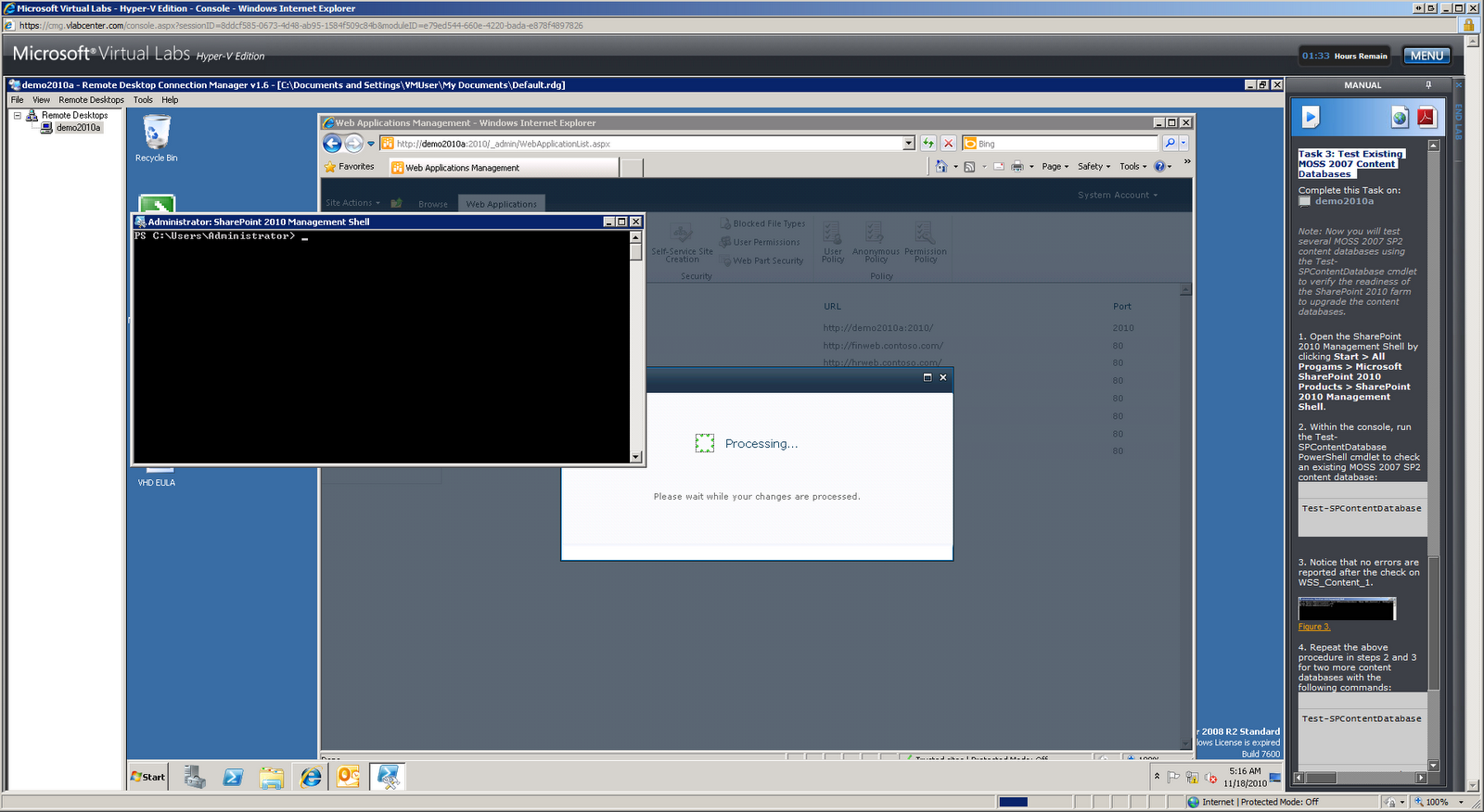
Task 3: Test Existing MOSS 2007 Content Databases


Testing:
(From Sharepoint2010 Management Shell)
Test-SPContentDatabase -Name WSS_Content_1 -WebApplication http://moss.contoso.com

(Gives a dos-box with all problems and solutions)


Exercise 2 - Gain Upgrade System Familiarity
(which turns out to be running just 1 command line in dos box, very simple actually !)

Task 2: Upgrade Two Content Databases at the Same Time
4. Wait for both command windows to close before continuing. Each window will close automatically. It is normal for one window to close before the other. This script may take approximately 5 to 8 minutes to complete. Progress can also be monitored in each of the command windows opened.
(it takes a while :P P)

Exercise 3 - Troubleshoot Upgrade Failures and Resume Upgrade

Scenario
In this exercise you will troubleshoot an upgrade issue by reviewing the upgrade log and then installing a missing solution and restarting upgrade from the command line.


Task 1: Open Failed Upgrade Log

Task 2: Find Errors in the Upgrade Log
(Opening logfile with notepad (copy & paste)..)

Task 3: Install Missing Solutions and Features
! .ps1 file is not in the F40 folder but 1 folder higher.

oops… doesn’t work..


Exercise 4 - Explore Visual Upgrade Features

5. Look at the page, noting that the user interface is still using the MOSS 2007 look and feel. The content database that contains this site collection was initially attached and upgraded with the -PreserveOldUserExperience option set to true, which is the default behavior.

Old interface takes forever to load..
Finally results into ‘An unexpected error has occurred.’


Task 3: Use the Visual Upgrade Preview

(still waiting for the old interface).
. In this lab, you learned how to…
• Verify existing 2007 farm and content upgrade readiness through the use of the 2007 pre-upgrade checker command.
• Verify existing 2010 farm readiness to upgrade specific content databases using the 2010 Test-SPContentDatabase cmdlet.
• Initiate upgrade for individual content databases using the 2010 STSADM –o addcontentdb command.
• Review the upgrade session status using the improved Central Administration web site Upgrade Status page.
• Initiate upgrade for multiple individual content databases using multiple PowerShell sessions to trigger parallel upgrade sessions.
• Troubleshoot an upgrade failure due to missing features, and how to restart upgrade for individual content database.
• Use Visual Upgrade features to switch sites from the 2007 product look and feel to the new 2010 product user interface.

Thursday, November 11, 2010

Microsoft Codename Atlanta (part1)

monitoring your SQL Servers by the specialist and at the specialist!
That sounds really fantastic and like the future ! No more complex and extensive installation and configuration of SCOM 2007 in the organization, SQL Monitoring in the CLOUD !! wow.. that sounds really really good, time to get hands-on :D :D
http://technet.microsoft.com/en-us/library/ff962512.aspx

Step1: Registration easy peasy with windows live ID

Step2: Installation -> certificate: easy
SCOM Agent client bit of a hassle since I tested SCOM environment before, this client can’t upgrade
the previous installed client and exits with an error.
Uninstalled everything with SCOM in it, tried again and success It now installed the agent.

Next up: Install the gateway “A gateway is an internet-connected server on your network”.
Here the fun starts… :


Tried to use the proxy server configuration: no success.. Asked the network admin, he says: you can try to download the Ms Firewall Client for ISA server; installed (reboot of course) and re-tried but
unfortunately this Gateway Settings setup can’t connect to the cloud.

Which makes me wonder how I can connect to the ‘cloud’ behind a firewall…

Finding some more documentation on the Microsoft support pages reveals:
http://onlinehelp.microsoft.com/en-us/atlanta/ff962505.aspx
Communication between the Atlanta agent and gateway

In order to enable communication between agents and gateways, the following requirements must
be met. Note that this configuration is enabled by default, so no specific action should be required.

Both the agent and the gateway need to be in trusted domains.
Gateway:

Ensure that the Server service (lanmanserver) is enabled.
Open TCP port 445 for SMB inbound traffic.

Agent:
Ensure that the Server service (lanmanserver) is enabled.
Ensure that TCP port 445 is open for outbound SMB traffic. This port is open by default.
euh.. not on our firewall ..
(Just posted the request to the network admin …)

Friday, October 29, 2010

(performance) issue solving by pinguins

Skipper, look.

Analysis.

Looks like a small bulb used to indicate
something unusual, like a malfunction.

I find it pretty and somewhat hypnotic.

That too, sir.

Right! Rico?

Manual!

(hit’s the light with manual)

Problemo solved.

- We may be out of fuel.
- Why do you think so?

We've lost engine one...

...and engine two is no longer on fire.

Buckle up, boys.

(thanks)

Friday, March 19, 2010

SSIS Traps

Okay, so our 8 year old sql server 2000 database server died..
At least, the SCSI RAID failed / all databases were migrated so IT Infra turned it off... There was only one little DTS which was turned off with it..

So, after a few weeks I got a call: I put my excell in the specified folder, but the website doesn't get updated ..

Off to the server room, turning on the server, going back to desk; still no reply on my ping.. back to server room again .. finding a monitor & keyboard: RAID FAILURE, press F1 to continue.. okay: F1 :P one drive disabled, the fun still continued :)

Win 2000 started, I Immediatly started the sql managment studio, found the DTS and started to taking pictures (server had no network connection) with my SLR :)

Okay, easy peasy; just a little DTS reading an CSV and putting the information in the database (luckly another SQL server, not this broken one).

5 mins work, at most....... right...............

Ofcourse, it's 2010 now, DTS is no more ! It's SSIS !! New & Funstuff!!
Lets quickly re-create this little DTS in SSIS :) :)
Oh, need Visual Studio Business Development Studio (1000 MB) to do this.. Okay, have SQL 2008 R2 CTP right here !! Lets install !! (see install issues previous blog.. )

So, I installed SQL 2008 R2, seeing NOTHING in the program files, no management studio, no BI Development Studio no nothing;
Starting install again ... checked all neccesary components again, it began installing .. again.. After install I got the tools !!

So lets get started ! (5 mins are WAAAAAAAAYYYYY gone already at this phase.. ;)

First trap:
Connections ->Data Sources to create new data source and re-use
(using new connection from datasource in connection manager (bottom screen))

Using a Excute SQL Task & Data Flow Task

Making connection with the CSV:
After double click on the Data Flow Task choose 'flat file source' from the toolbox and drag it on the main screen. Double click it and fill in the path and create new Flat File Connection.

Here comes the second trap

DTS did by default a truncation of data which did not fit into a column. (Or maybe it didn't care about column with at all); SSIS DOES care about column with, so the default with of 50 is maybe a little tight and easy overlooked.
In my case I had one column with 689 chars and so SSIS turned red for the first time real soon giving a truncation error.
At first I changed all the column widths to 255 / 689 exact according to the destination dbase data-types. The truncation errors stayed as if nothing happened.
So, apperantly I had a column somewhere which was > 255, nice..

I wasn't feeling like checking 4000 rows what the max column with was..
So, googling.. found you can change SSIS's behaviour on checking / failing on this. I'ts configured in double click on the flat-file choose error output ->change the truncation column from 'Fail component' to 'Ignore failure'. Second problem fixed.

Third trap
As I'm importing the data into a SQL Server, it might look obvious to choose 'SQL Server Destination' as a destination for the CSV file. This is another trap :)
As it turns out to be, the name 'SQL Server Destination' implies that you want to do a 'BULK INSERT' which is damn fast blablabla BUT not supported on remote sql server's. So you SSIS must be on the same server as the destination dbase.
Which, in my case insn't so. Luckly SSIS gives an very descriptive error about that :) So I choose a OLE DB Destination :)
Third trap fixed :)

Fourth trap
Column mapping. Remembering the good old days where my DTS just used to discover the dbase columns and csv file columns and automatically map those.. SSIS doesn't seem to understand col001 - Column 01 mapping ... So, changing those names 34 times ... and again in the mappings screen, 34 times.. sigh.. did I say 5 mins ??

Okay, renamed the columns, automap works ! (no need to draw 34 lines... :P )

Pressing play.... GREEN ! It actually turned green !! omg !!
Only one problem.. my data is in beteween " .. "bla1","bla2" etc
And my SSIS nicely places it in dbase with "bla1"
:) ooh that's an easy one, I saw 'text qualifier' option in the Flat File Source options screen; Placing an " as a text qualifier, press play again -->RED

resulting in Fourth Trap
if you use the " as text qualifier the SSIS gives an error saying it can't qualify the last column. I fixed this using the Flat File Connection Manager Editor.
In the 'advanced' pane, go to the last column and change the value for the last column from TextQualified true to false; Problem fixed :)
Pressing play, GREEN again :) but already noticed Fifth Trap.

As i'm doing full import everytime I need to truncate the table before filling it with fresh data. So I already put an truncate table SQL task in my SSIS with a nice green arrow to the DataFlow task. And this works fine, only because of the Fourth Trap I noticed this is not really best practice, resulting in an empty table when something goes wrong in the DataFlow task. So I need a transaction based execution.
In the 'Execute SQL Task' I changed the property 'TransactionOption' from Supported to Required. This resulted in the Sixth Trap

Transactions
changing this option immediatly resulted into a RED SSIS with the error
[Execute SQL Task] Error: Failed to acquire connection "Bla". Connection may not be configured correctly or you may not have the right permissions on this connection.

(oh by the way, we're entering the second day in this '5 min' time-path now..)
Googling for this error and for enabling transactions in SSIS; One option you should enable is 'RetainSameConnection' = True in the shared datasource properties
This didn't help. So googling futher..

After few hrs of googling, trying I think I must look into the DTC issues.
I looked ito the book 'Microsoft SQL Server 2008 Integration Services, page 510; Which gives a sample without the use of the DTC; Implemented this and.. it works !
I even didn't specify a failure path, it just works out of the box; defining an TSQL Statment 'BEGIN TRANSACTION' and 'COMMIT TRANSACTION'.
Just to be safe I also defined a 'ROLLBACK' on the failure paths :)
BE AWARE that all tasks use the same Connection Manager. In addition to this, you must make sure that the RetainSameConnection property on the Connection Manager is set to True ! (page 510).

Seventh Trap
The failure paths are default on an 'Logical AND. All constraints must evaluate to True' setting. Which implies there can only be one failure path. So I changed this to the OR mode, which makes all red lines go dotted and works great :)

Eight Trap
Now this thing works on my dev-machine, got to get this on production sql ! Trying to publish to a sql 2005 server is NOT going to work. So, publish it to a sql 2008 production SSIS enabled server.. euh.. we ain't got those.. sigh..
So, I just publish to my own dev-sql2008 and asked IT infra to create a production version :)

Last trap
Okay, just before publishing I discovered an error. As it seems, my solution in 'Fourth Trap' isn't working.. The last column still has data surrounded by "blabla" in the resultset. I spent the rest of the afternoon googling for solutions but only found same issues. Now asking for a change in the export format, for a different column or data delimiter..

[Flat File Source [1]] Error: The column delimiter for column "Column 31" was not found.
-->prob. I'm having this issue: http://social.msdn.microsoft.com/Forums/en-US/sqlintegrationservices/thread/a2ed5d71-b749-47ed-abb2-d745b0a2020a

To be continued.....
Resources:
http://ssisblog.replicationanswers.com/2008/01/10/escaping-double-quotes-in-flat-files-ssis-is-different-to-dts.aspx

Installing SQL Server 2008 R2 November CTP

Okay, apparently you need to hack your registry to get over the 'reboot your system' issue during the install process... :(

To fix this:
search your registry for: PendingFileRenameOperations
and delete all keys you find !

No reboot required, just do a 'rescan' and this issue is solved :)


Thanks: http://social.msdn.microsoft.com/Forums/en-US/sqlsetupandupgrade/thread/988ab9e3-26ce-48da-ad61-c458f5c9c539

Tuesday, June 02, 2009

Finding metaphors for getting better understanding in your IT projects

Situation:Expansion of running application (discussion of building a new module on it), meeting with you (developer), bunch of other guys (donno what they do really...)

Comments during meeting:
They: Just expand it ! We do not have to think, you just expand, you build it before, this is just the same.

you: it doesn't work this way, things have to be looked up/ defined / designed, then building, than testing then production etc.

They: ok, tell us what you need, what do you need what we have to find out ?
They: why do you have to test ? you build the other modules before right ?
They: how can this module be difficult ? It's the same as the other modules!

Metaphor:
You: Lets pretend you are working for a major car builder, lets say opel. You invent, develop and produce cars. We are in a meeting to discuss a new model for opel, something like the 'Opel grand futura'.
This new model is a car, and it IS from Opel. But that's where the comparison stops!
It is NOT the same as the previous, it has a different engine, different suspension etc etc. BUT the WORK-PROCESS CAN be the same; so I need to develop the enging, body works, suspension etc etc (maybe based on previous model-suspension / engine etc) but YOU guys ALSO need to performe some actions like, promoting the car, create a manual, prepare for launch, PR, commercial stuff etc. etc.
Stuff I don't do as a developer.

So DON'T ask me what YOU should do, please learn those lessons yourself!
(and execute them..)

Thursday, May 28, 2009

buying a (slr?) camera

you asked me what I suggest for buying a nice camera... Well... I have some experience (bought loads of them myself) :P
But the main issue is.. what you wanna do with it... I own a Nikon D70s, D80 and D90 camera; which are Single Lens Reflex camera's (you look through the lens by using a mirror and a pentaprism).
pro: You can buy as much lenses as you wish, each with their own price and possibilities
pro: you get a cam that always works, responds very fast (to capture the fast moments) and no issues with batteries or so.con: they are heavy (also depending on the lens you put on)

con: lenses can be expensive
con: to get great pictures in low-light conditions (indoors) you must spent more money then some cheaper compact camera's
con: heavy!

Nikon, Canon, Sony or Olympus ? (my tip is to go to the shop, hold them in your hand and choose the one which feels good to you, in quality things are almost the same)

Compact camera's:
con: less control on focus / exposure (no special effect photos)
con: not expandable

pro: no dirt in the camera (fixed lens)
pro: small and light !pro: newest nice to haves are implemented (smile detection, taking movies with them as well etc etc)

I don't know your experience in photography so it's my general story i tell to people; If you like some details, feel free to mail me your questions, i'll try to answer them :)

my buying tips if you want to buy a SLR:(between the steps several years can pass.. (to save some money ;) )

1) Nikon D60 / D90 / D5000 /D700 (depending on budget) + 18-105 VR kit lens
2) external flashlight: SB-600 /SB-900 (for great indoor pictures, flash using the ceiling)
3) Nikon 50 mm 1.4 (about $50, great great lens)
4) Nikon 70-300 VR telephoto lens
5) Sigma 10-20 mm for Nikon

If you like you can see very nice reviews of almost every SLR and Compact camera's out there @ dpreview

Wednesday, July 30, 2008

My First (third to be honest) Imfied blog post :)


This blog is posted using the google talk imfied chat bot client. This is great stuff ! 1 single application (IM chat client) to put and get information; Different subsystems all tied toggether using a single sign on IM chat bot client !
to be continued

Friday, April 25, 2008

No more mail

Yesterday we had a sligt issue with our exchange (2000) server; In the morning everybody got a warning mail saying the drive was at 96% of the total capacity. As you can guess... 1 mail to many persons = no action :(

And then exchange could not write his logfiles anymore; and then ??? no more mail for 1500 users; Expanding the drive was not possible; Thanks to google I found this nice article 'How to Recover from "Disk Full" on an Exchange Log Drive'
(http://msexchangeteam.com/archive/2004/05/12/130556.aspx)

Most important line from the text:
...and make sure that each database shows Log Required: 0-0 and State: Clean Shutdown.
If this is the case, the you can move all numbered log files, but do not remove the current log file (Enn.log).

Thanks again, Google :)

DCOM Fun

Ok, checking the windows eventlog is not one of my favorite things to do, but sometimes 'I'm feeling lucky' and start digging in the pile of shit called the eventlog.
On almost every server I find the DCOM error. Here is a nice soluton:

DCOM Fun with SharePoint

Tags: Security, SharePoint, Troubleshooting @ 4:29 am
One thing you will first notice in planning a MOSS install is the sheer number of service accounts used. Without proper planning, it is only going to result in a poor set up and most likely be insecure. Despite the complexity of having to learn what each service account is required for, MOSS2007 does a reasonable job in working in a restricted configuration. Properly configured, the majority of these accounts can run with minimal security privileges.
If you follow all the best practice guides, and religiously read Joel’s stuff, I would be preaching to the converted.
Anyhoo, there were some side effects with all of this which, when last I did it, were not in the official guides. Nothing major, but some annoying DCOM errors in the eventlogs. I didn’t even spend too much time working out which activity was causing them, but simply granted the minimal permissions required.
The config here was 2 WFE servers (intranet/extranet), one index/query server and 1 SQL cluster

All Web Front End Servers:
Event Type: ErrorEvent Source: DCOMEvent Category: NoneEvent ID: 10016User:Computer: WEBSERVER1
Description:The application-specific permission settings do not grant Local Activation permission for the COM Server application with CLSID {61738644-F196-11D0-9953-00C04FD919C1} to the user l SID (S-1-5-21-573225893-205518295-00000000000-00000). This security permission can be modified using the Component Services administrative tool.

Remedy:
Search the GUID in HKCR registry…
61738644-F196-11D0-9953-00C04FD919C1
The service name for this key is “IIS WAMREG Admin Service”
Load DCOMCNFG, browse to My Computer -> ” DCOM Config”
Go to the properties of IIS WAMREG
The permission missing was “Local Activation” permissions for the user .

DATABASE SERVERS
Event Type: ErrorEvent Source: DCOMEvent Category: NoneEvent ID: 10016User:Computer:
SQLCLUSTER1
Description:The application-specific permission settings do not grant Local Launch permission for the COM Server application with CLSID {ABF05265-635E-44B0-A28F-AEA45247ACA0} to the user SID (S-1-5-21-573225893-205518295-3307690801-69150). This security permission can be modified using the Component Services administrative tool.

This event seems to occur at: 12:00AM, 6:00AM, 12:00PM and 8:00PM.
Note: This error will be related to a SharePoint timer job of some description, and thus, we need more permission that just the base SQL Server roles that were set up originally.
Remedy
The application for this CLSID is called “Microsoft.SqlServer.Dts.Server.DtsServer” in the registry.
Launch DCOMCNFG on SQL02 and SQL03. The DCOM name is MSDTSServer
Under security, choose to Edit “Launch and Activation Permissions”
Add the user to have local launch permissions

EXTRANET WFE Server
Event Type: ErrorEvent Source: DCOMEvent Category: NoneEvent ID: 10016User:Computer: EXTRANET1
Description:The application-specific permission settings do not grant Local Activation permission for the COM Server application with CLSID {61738644-F196-11D0-9953-00C04FD919C1} to the user SID (S-1-5-21-573225893-205518295-0000000000-00000). This security permission can be modified using the Component Services administrative tool.

Remedy:
Search the GUID in HKCR registry..
61738644-F196-11D0-9953-00C04FD919C1
The service name for this key is IIS WAMREG Admin Service
Load DCOMCNFG, browse to My Computer -> ” DCOM Config”
Go to the properties of IIS WAMREG
The permission missing was “Local Activation” permissions for the user .

QUERY/INDEX SERVER
Event Type: ErrorEvent Source: DCOMEvent Category: NoneEvent ID: 10016User:Computer: INDEX01
Description:The application-specific permission settings do not grant Local Activation permission for the COM Server application with CLSID {61738644-F196-11D0-9953-00C04FD919C1} to the user SID (S-1-5-21-573225893-205518295-3307690801-00000). This security permission can be modified using the Component Services administrative tool.

Remedy:
Search the GUID in HKCR registry..
61738644-F196-11D0-9953-00C04FD919C1
The service name for this key is IIS WAMREG Admin Service
Load DCOMCNFG, browse to My Computer -> ” DCOM Config”
Go to the properties of IIS WAMREG
The permission missing was “Local Activation” permissions for the user .

Wednesday, March 21, 2007

WHOESSAAAAAAAAAAH

Whoessaaaaaaah (c) by bad boys II..
pre: sorry for some bad english here and there; when i'm frustrated.. i'm not paying much attention...

I've whoessahhd many times today; so many.. I thought: must blog this..
First things first; what I was trying to do;

INFOPATH ! Yeah !
Nice tool from microsoft, as a client for a dbase connection;
Make some sql dbase fields; plug them into your infopath form and build
yourself a dbase driven (web) form ! (And publish it on sharepoint)

First hmm: hmmm all users seem to have the power of InfoPath to view the form..
That's a bummer.. I DO NOT want to install infopath (by hand) on 1500 pc's..
'No ! It is possible to view infopath forms without infopath !' The MS-Entausiastic screems; ok.. how..

hmm2: Trying to find professional information about an professional product; (InfoPath).. is it possible ?
almost every search query seems to turn up as a ms-stupid-need-noinfo-nobrain 'look i'm using a computer' website;
With movies on how to fill in a form, links that call otherlinks that call the original links; ok .. I'm going nuts..

Afther hours of clicking the quest is: Microsoft Forms Server 2007
(Where do you get it ? knobody knows; how do you install it ? knowbody knows; pff thank god for the msdn download library
(forgive god for the msdn-login bug that seems to show the default msdn page sometimes after logging in, and not the download
page you are looking for).
Downloaded it; was looking at the description; hmm3 must be installed at the sharepoint server; ok; Mounted the iso to the
vm-ware machine (Thank god for vm-ware); Hmm4 auto-executes a CMD.EXE; to determine if the vm-machine has a x64 processor..
(if it asked me, I would answer.. but that's to easy I think..)
Running setup; all services are going down during install (what else is new) after running step 1 - 10 (who cares .. ) and 30
minutes... FINISHED !
Hehehe nice! Yeeeehhaaaaa (to early ofcourse); The services are started again (yeah; that's a new one) ok; let's publish
some forms for those users with only IE / Safari :P

NOT!!!
Hmm5: the following error occures when trying to publish the infopath document to the document library:
"Dit formuliersjabloon is browsercompatible, maar kan niet voor browsers worden ingeschakeld op de geselecteerde site."
(i'm using the dutch version but it comes down to: yes! you've created an browser-compatible infopath document but to bad..
the server-site is not configured to run this kind of document...)
(With the checkbox you NEED to check grayed out nicely... so at least you know it's there.. but it's out of reach.. yeah... )
goddnan@U#@IA

Ok..Going trough the help = commercial bullshit site = links to links to links = NO GOOOD
NO INFORMATION ABOUT HOW TO CONFIGURE THE Forms Server into the sharepoint environment; (Even if the link title is:
'How to configure forms server 2007 into your sharepoint environment); it's unbelivble.. I know..

The solution:
Ok; all the sites that are beginning with office.microsoft.com are EVIL!!!!!!!! (read NO GOOD)
Alternatively: technet; found this page:
http://technet2.microsoft.com/Office/en-us/library/2042cbb3-312a-461b-825a-9d72648bdeea1033.mspx?mfr=true
This will now be reffered to as: "The holy page" ...
This page is titled: "Deploy form templates (Office Forms Server)" (also forget to search in your locale; (dutch) that is
really no good);
Scrolling.. scrolling... :
"Configure InfoPath Forms Services for a site collection"
YEAAAAAAAAAAAHHHHHHHHHHHH
Bingo !
(to early)

Activate the Content Management, Search, and Business Information feature for a site collection
The Content Management, Search and Business Information feature now shows a status of Active.
1. In a Web browser, open the SharePoint site for which you want to enable InfoPath Forms Services.
2. Click Site Actions, and then click Site Settings.
3. In Site Collection Administration, click Site collection features. If you do not see the Site Collection Administration
section, you do not have permissions to perform this task.
4. On the Site Collection Features page, find the Content Management, Search and Business Information feature, and then
click the Activate button.

WTF ??????? "Search and Business Information feature" ????????
What the hell does that has ANYTHING to do with Forms... ???
But thank god; this feature does not exist on the page; there is however a feature called:
InfoPath Forms Services support
InfoPath Forms Services lists and related pages to enable server side rendering of Forms.

OOOH YEAHHHH
And there it is... the holy button... a button called "ACTIVATE"
God../ Bill / I must ask ... WHY ????? IS THERE A button called "ACTIVATE" and WHY does the 'wizard' after 10 steps NOT
include 'pressing' this button ??????

AAAAAAAAARGH
to be continued

Hmm the 'to be continued' is faster than I thought..
aaah...
"Although the form template is uploaded, it is not yet available to users. It must be activated by the administrator of the
site collection to which the form template will be activated. This can also be performed by a farm administrator who also has
administration privileges to the site collection. For more information about activating form templates, see "Activating
administrator-approved form templates" on this page."

close.. but no sigar..
to be continued

Monday, February 19, 2007

FantaSea review: Part1: The Light


Hi !
I'm back again and going to post a review of my recently bought FantaSea underwater set for my Nikon D70 camera;

I'm writing this review because I think the FantaSea products are great and finally affordable; The total underwater solution for my D70 was approx $1300,- and not $3500 or more, like other products.
Also I would like to thank FantaSea for beeing patient with me and for answering al my questions ! So as a thank you; here a review :)

First part on is the FantaSea 44 LED light wich I intend to use primary for night diving & focus light; Here above, the packuage in wich the LED 44 Light has been deliverd to me.

Dimensions & build

The light is built form a very strong plastic; With it's dimensions of 200 x 68 mm it's a very small and handy light; It contain's 5x AA 'penlite' batteries and gives a lot of light! (See later on for the light spot). The light also contains a hand lanyard for securing to the wrist when serving as a night light. The light includes a mounting ring and stainless steel wing nut which allows for easy attachment to the lens port bracket for the FD-70 ports system.


The light head is firmly secured to the body using a fine screw-thread and o-ring. By appling a counter-clockwise twist the head comes off and shows the batteries.


An easy batterie-schema is provided so no worries about inserting them the wrong way. Also a nice red-mark and nudge are created in the body; nothing should go wrong here ;)

The light head is surrounded by a metal foil, wich in turn is protected by a plastic fitting. You can see the red nudge in the bottom wich you should align with the light-body.
The 44 LED lights deliver a huge amount of light; to much to look into.
This version also has a 'Emergency Strobe' funcion wich could be usefull to attract your buddy's attention :P
A bright LED light is blown out of the 44 LED's; I'm impressed with it and looking forward how it will perform underwater... :)

The spot on the ceiling; Projected in daylight;


Monday, November 06, 2006

Moving servers


Pfff what a weekend,
Friday worked until 00:00:00 and Saturday again from 08:00 until 16:00; Moving all the servers from upstairs to downstairs;
But, everything seems to be in order now :)

Monday, October 30, 2006

Jeehj; there were some issus during my first post :P
But now blogspot seems to be functioning again :)

Created a remote setup-tool today, using psexec from systernals. Some fine tuning and after that I'm able to update 1200+ clients :P (I hope)...
They all must be enabled for sql native client. (And sql native client needs windows installer 3.1 and windows installer 3.1 needs windows 2000 sp4 and .... omg... HELP)

Attached today is a screendump of the server we bought to host the sql2005 ent edition:)

That's right...:) 8 procs, 12 gb's of memmory just waiting to do someting ....

Saturday, October 28, 2006

First picture (from picasa2)


This is a picture i took during a wedding-day. I cut-out the background, leaving the flowers and the little girl in front. Then giv'n the background a black color. The girl and flowers get more color, because there are no disturbing background "things" to distract you.
The picture has been selected for the wedding album :)

Posted by Picasa

first blog

Hello world,

This is my first blog entry, jeeehj;
Just trying things; don't expect much :) I have an idea to post images to a blog, and then referencing those images from an external website; But don't think that's gonna worke..

Will try to blog mainly technical-nerd-stuff; like sql 2005 experiences, visual studio; hardware etc. Maybe some hobby-stuff, diving, photography; we'll see..

Greetz,
Shuwi alias schoennie :p